Blog·
Automated tagging was supposed to be impossible. We made it work.

MyGamePlan
Football Analytics Platform

Somewhere tonight, an analyst is tagging clips by hand for tomorrow's session. Marking up every goal kick, every build-up, every set piece, the way their staff actually wants to see them. It is careful, skilled work, and for years it was the most time consuming part of the analysis workflow that automation never managed to take off their plate.
Why it couldn't be done before
Analysts don't tag generically. They tag for their own game model, for the next opponent, for the specific questions a head coach asks on a Monday morning.
A generic engine can hand you a "short goal kick" or a "long goal kick." It cannot know that your staff only cares about the goal kicks that beat a two-striker press and progressed into the final third, because that is how you play and that is the picture you want on your next opponent. The detail that matters to your club lives in your head, not in an off-the-shelf event definition.
So clubs faced a trade-off that felt permanent. You could have automated tags, but only generic ones. Or you could tag the game the way your staff sees it, by hand, for every match. Specific and manual, or automated and generic. Pick one.
What changed: you can now define the data model
With MyGamePlan, the club defines the metric itself, in plain football language. You describe a principle the way you would explain it to a player:
When any player of my team makes a possession loss in the attacking half, any player of my team must make a possession gain within 5 seconds.
Once a principle is described that precisely, the platform finds every instance of it automatically, across every match in the season, each one already linked to video. The specificity is no longer the obstacle. It is the input. As we like to say - If you can describe it, we can track it, and once it is described, the tagging runs on its own.
Then a second layer goes on top. Combining event data with tracking data adds context an event feed alone never could: how the opponent was pressing, the block they were sitting in, the shape and distances around the ball. So a tag does not just say "a goal kick happened." It carries the game-context around it. That is what turns a flat list of events into something you can actually scout against.
Here is what that depth looks like across three moments every staff prepares for.
Example 1: Goal kicks
Before: short or long. That was the entire split. Two buckets.
Now: any depth you want. Short, short-then-long, and whether the kick progresses into the mid third or the final third. On top of that, you can split goal kicks by the kind of opponent that faced them, including how many strikers the other team pressed with.
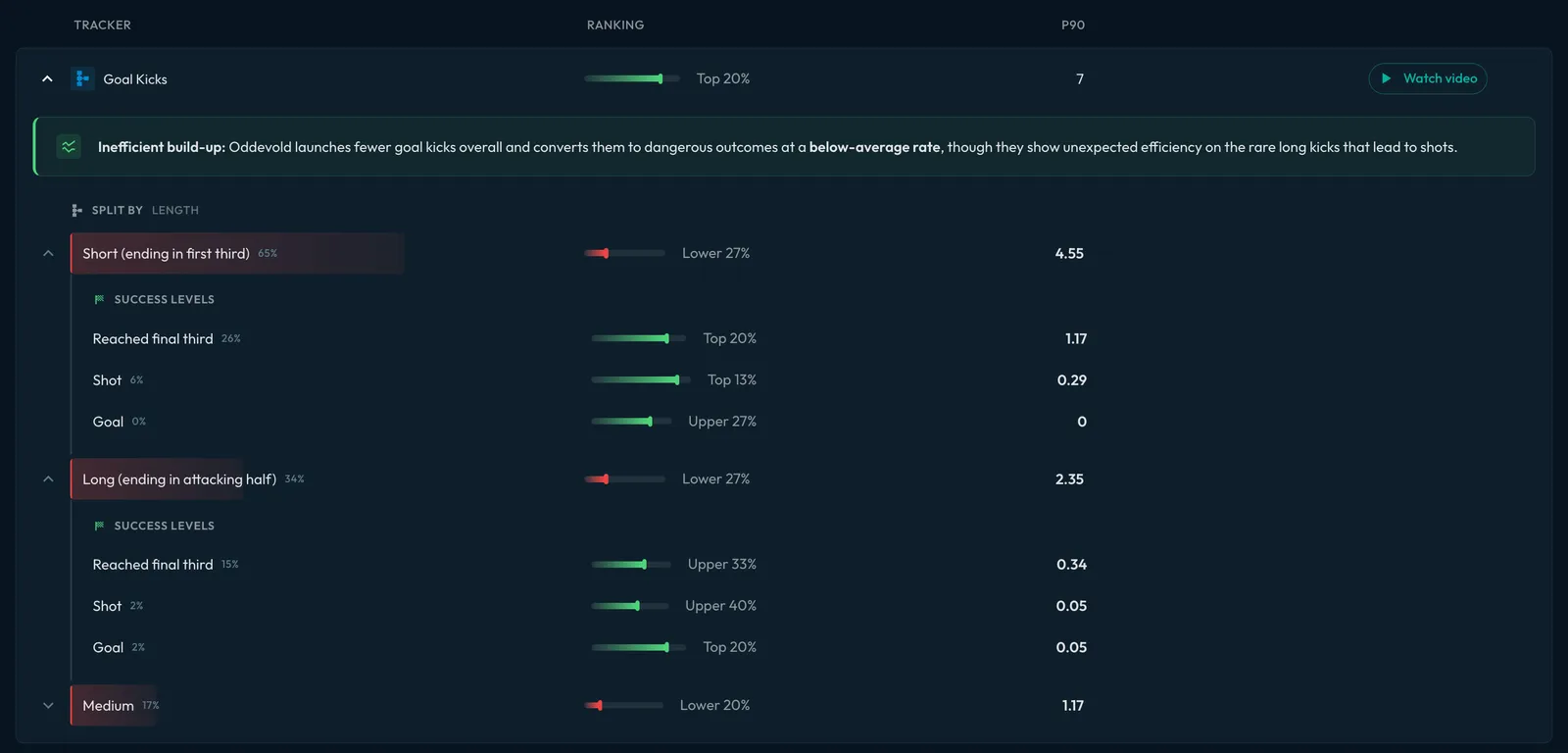
That last part is where it gets useful. You press with two strikers, so you want to study how your next opponent builds against a press that looks like yours. Pull every goal kick they took against a two-striker press, that broke the press, and progressed into the final third. The clips are already there, already filtered. Nobody tagged them at 11pm.
Example 2: Open-play build-up
Before: one bucket. Every open-play build-up pass, lumped together.
Now: split by the block they face, high, mid or low, and by how the opponent presses. Then each pass is labelled by whether it broke the press, and how far it got: into the attacking half, into the box, or all the way to a shot.
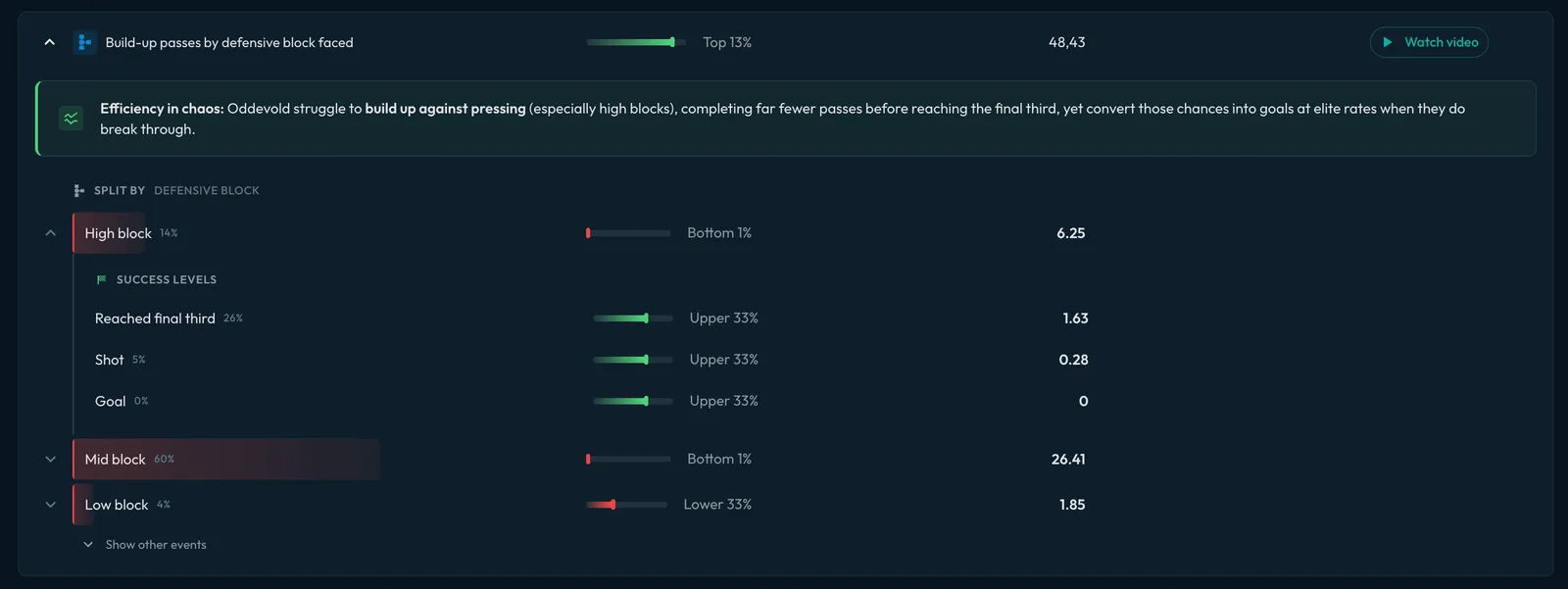
Each pass now carries its own game-context. So instead of scrolling through every build-up in the season, you study only the build-ups that beat a high press and reached the final third, because that is the problem in front of you this week.
Example 3: Set pieces
Before: split by set-piece type. Corner, wide free kick, throw-in. That was the depth.
Now: short versus in-swing versus out-swing, who wins the first contact, and whether a shot or a goal follows within seconds of delivery. The same depth runs on the defensive side too, so you prepare both how you attack a corner and how you defend one, from the same data model.
Scout the exact picture you'll face
Stack those filters and the workflow speaks for itself:
All of their goal kicks. Against a two-striker press. That broke the press. Into the final third.
Already tagged, already filtered, before you have opened the laptop. The clips you would have spent an evening building by hand are sitting there the moment the match data lands, because the platform was tagging to your definition the whole time, not to a generic one.
And it leaves your existing process intact. You get auto-tagged XML files for every game, in your own structure, with your naming and your logic, ready to import into the video tool you already use with a single click. No re-building your workflow. No manual tagging the night before.
Tag football the way you coach it
For a long time, automating tagging meant accepting someone else's definition of the game.
That is the part that has changed. The data model is yours, so the tags are yours, and they still run automatically. Every match, as specific as your game model, tagged the way your staff actually thinks about the game.
Want this set up for your club? Book a call.
Run this on your own matches.
Ask MGPT about your team or your next opponent. Free to try with your professional email.